All Products

.svg)





A practical guide to how IVR actually works: the technology under the hood, the three types of systems, where it delivers value, and the common failure modes to design around.
Interactive Voice Response is the automated voice system you hear when you call a business, the one that asks you to press 1 for sales or say “billing” to reach the right team. It’s one of the oldest pieces of contact center technology still in daily use, and also one of the most misunderstood. Done well, IVR resolves simple queries without involving a human, routes complex ones to the right agent, and saves both the business and the customer time. Done badly, it’s the reason people press 0 repeatedly and hope for the best.
This guide covers what IVR actually is at a technical level, the three main types of system, what’s changed in the NLP and AI era, and the design choices that separate good deployments from bad ones. It’s meant as the reference you’d keep open while scoping or rebuilding an IVR, not a sales pitch.
Key Takeaways
- What IVR is: Automated phone technology that interacts with callers via keypad inputs (DTMF) or spoken responses, and routes or resolves calls without an agent.
- Three main types: Touch-tone (DTMF-based), directed dialogue (limited voice), and natural language (free-form speech with NLP). Each has distinct trade-offs.
- Core technologies: DTMF signal processing, Automatic Speech Recognition (ASR), Natural Language Processing (NLP), Text-to-Speech (TTS), and Computer-Telephony Integration (CTI).
- Where it saves money: Handling routine, high-volume queries, balance checks, order status, appointment confirmations, password resets, that don’t need a live agent.
- Where it fails: Deep menus, no agent escape, poor voice recognition on accents, and generic flows that ignore caller context. These are design problems, not technology problems.
- What’s changed recently: NLP-driven IVR has moved from experimental to mainstream. Conversational AI now handles queries that would have needed an agent five years ago.
What is IVR?
Interactive Voice Response is a telephony technology that lets a caller interact with a computer system over the phone, either by pressing keys on their keypad or speaking into the handset. The system plays back pre-recorded or synthesized audio, interprets the caller’s input, and takes an action: playing information, routing the call to an agent, updating a record, processing a transaction, or hanging up.
IVR has been part of telephony since the 1970s, originally as expensive on-premise hardware in bank and airline call centers. What’s in use today looks very different under the hood, cloud-based, software-defined, integrated with CRM and AI, but the core idea is unchanged: a phone call that can complete useful work without a human at the other end.
Why businesses use it
Three reasons come up in almost every deployment:
- Capacity without headcount. IVR handles repeatable, information-based queries, account balance, shipment status, appointment time, at close to zero marginal cost per call. Live agent headcount can then focus on work that actually needs a human.
- Availability outside staffed hours. An IVR doesn’t clock out. Customers calling at 2 a.m. for an order status get an answer, not a voicemail.
- Faster routing when a human is needed. Even when IVR doesn’t resolve the issue, it can collect the information the agent will need (account number, reason for calling, language preference) so the live portion of the call starts with context rather than a blank slate.
The three types of IVR systems
Most “IVR” conversations collapse three genuinely different kinds of system into one bucket. They cost differently, fail differently, and suit different problems. Here’s the real taxonomy.
1. Touch-tone IVR (DTMF-based)
The classic “Press 1 for sales” model. The caller navigates menus by pressing numbers on the keypad, and the system routes based on those inputs. It’s the oldest and still the most common type, reliable, cheap, and works on every phone ever made.
Best for: simple menu navigation, high-volume routing, environments where voice recognition would struggle (call centers, factory floors, mobile callers with background noise).
Limitations: menus with more than a handful of options become hard to remember, and deeply nested menus frustrate callers. It also assumes the caller can see and use a keypad, not always true on hands-free or accessibility use cases.
2. Directed dialogue IVR
A middle ground. The system asks a question and expects one of a few specific spoken answers, “Would you like billing, technical support, or sales?” and uses speech recognition constrained to that short list. It’s more natural than pressing numbers but still structured enough to be reliable.
Best for: contact centers that want a less robotic feel without committing to full NLP, or environments where callers can’t easily use a keypad (driving, mobility-limited users).
Limitations: still menu-driven at heart. Accents, background noise, and callers who phrase things unexpectedly will produce errors.
3. Natural language IVR (NLP-powered)
Open-ended voice interaction. The system asks something like “How can I help you today?” and the caller answers in their own words. NLP parses the response for intent (“I want to check my balance”) and entities (“the account ending in 4429”), and routes or resolves accordingly. This is where most new investment is going in 2026.
Best for: complex call flows, high-value interactions, and customer bases that expect conversational experiences. Also increasingly paired with generative AI agents that can have multi-turn conversations.
Limitations: more expensive to build and tune, more points of failure, and requires ongoing maintenance as language patterns shift. Poorly-trained NLP produces worse experiences than a well-designed touch-tone menu.
Quick comparison
| Type | Input method | Best for | Complexity | Typical cost |
| Touch-tone | Keypad presses (DTMF) | Simple menus, high-volume routing | Low | Lowest |
| Directed dialogue | Limited voice responses | Structured queries, hands-free use | Medium | Moderate |
| Natural language | Free-form speech (NLP) | Complex requests, modern CX | High | Highest |
Everything your team needs in one platform
How IVR works: architecture and core technologies
An IVR system is a small ecosystem of components, not a single piece of software. Understanding what sits where is the difference between a deployment that scales cleanly and one that breaks every time something changes.
The architecture layer by layer
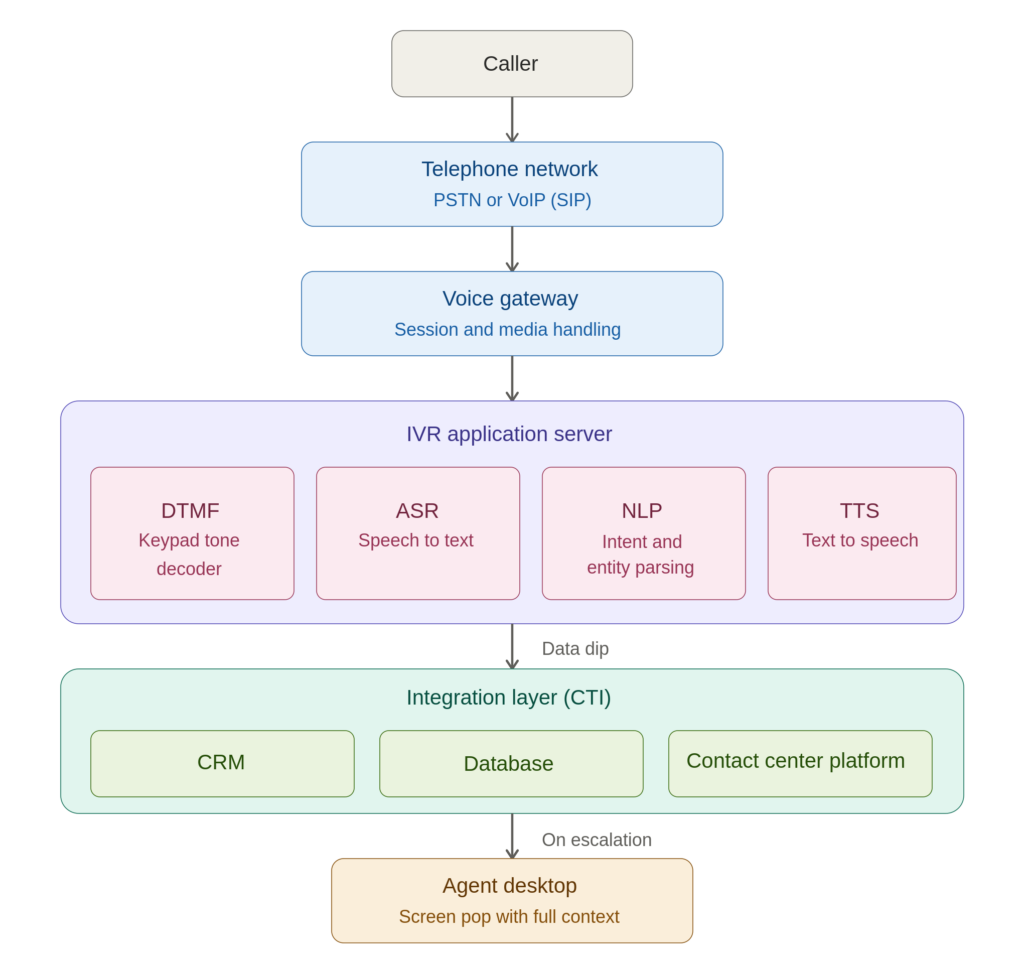
- Telephone network layer. The call originates on either the Public Switched Telephone Network (PSTN: traditional landline and mobile) or over VoIP (Voice over IP, using protocols like SIP). Modern IVR is almost always VoIP on the business side even when the caller is on a traditional phone, with a voice gateway translating between the two.
- Voice gateway and session management. Handles the incoming call signal, manages the audio stream, and hands off to the IVR application server. In cloud deployments, this layer is often invisible, the CCaaS platform handles it, but it’s where calls can drop or fail if capacity isn’t provisioned correctly.
- IVR application server. The brain. Runs the call flow logic, processes DTMF tones, runs speech recognition and text-to-speech, and decides what to do next. Most modern platforms let you design these flows in a visual builder rather than code, drag-and-drop IVR designers are standard in CCaaS products now.
- Integration layer. Connects the IVR to the systems that actually hold the data it needs, CRM, order management, billing, knowledge base. This is where Computer-Telephony Integration (CTI) does its work, surfacing customer records to agents and letting IVR “data dips” fetch account information mid-flow.
- Agent routing and contact center software. When the IVR decides a human is needed, it routes the call to the right agent via the ACD (automatic call distributor), passing along everything collected so far, caller ID, account number, reason for calling, queue priority.
DTMF: how “press 1” actually works
When you press a key on a phone, your handset generates two simultaneous tones, one from a low-frequency group and one from a high-frequency group. Each key corresponds to a unique pair. Pressing “1” produces 697 Hz (low group) combined with 1209 Hz (high group). The IVR system detects both frequencies, matches them against the DTMF grid, and knows exactly which key was pressed. This is why it’s called Dual-Tone Multi-Frequency, two tones, multiple frequency pairs, one reliable signal.
DTMF has been around since 1963 and is essentially unchanged because it works. The frequencies were deliberately chosen so no two would combine to produce a third that could be confused with another key, and so none match common human speech patterns, you can’t accidentally trigger DTMF by talking.
The DTMF frequency grid
| 1209 Hz | 1336 Hz | 1477 Hz | |
| 697 Hz | 1 | 2 | 3 |
| 770 Hz | 4 | 5 | 6 |
| 852 Hz | 7 | 8 | 9 |
| 941 Hz | * | 0 | # |
Speech recognition (ASR)
Automatic Speech Recognition is the technology that converts spoken audio into text the system can act on. Modern ASR uses deep learning models trained on very large speech datasets, and its accuracy on clear speech in major languages is now high enough for production use. Where it struggles: thick accents under-represented in training data, heavy background noise, overlapping voices, and domain-specific vocabulary (medical terms, product codes).
Good deployments design around ASR’s weak spots. Confirmation prompts (“I heard ‘account balance’, is that right?”) catch misrecognitions. Fallback to DTMF is offered for noisy environments. Domain-specific vocabulary is tuned in the language model rather than left to the defaults.
Natural Language Processing (NLP)
NLP is the layer above ASR that interprets what the words mean. ASR gives you the transcript; NLP extracts the intent (what the caller wants) and the entities (the specifics, account number, date, product name). So if a caller says “I want to check my order from last Tuesday,” ASR produces the text; NLP recognizes the intent as an order status check and the entity as a timeframe of “last Tuesday.”
NLP has advanced sharply in the last few years, driven by the same large-language-model research that produced conversational AI. Voice assistants now handle multi-turn conversations, clarify ambiguous requests, and hand off cleanly to human agents with full context. This is where the line between “IVR” and “voice AI agent” is blurring and where most new contact center AI investment is going.
Text-to-Speech (TTS)
The other direction of conversion: generating spoken audio from written text. Older IVRs relied entirely on pre-recorded prompts, someone would go into a studio, record every possible response, and the system would play the right clip. Modern TTS generates speech on the fly from any text, in a natural-sounding voice, usually with support for 20+ languages.
Dynamic TTS is what makes personalized IVR responses possible. “Hello, Ana, your balance is 243 euros” can be generated live from CRM data without anyone pre-recording anything. Voice quality in the best current systems is hard to distinguish from human speech in short utterances, though still noticeable in longer passages.
Computer-Telephony Integration (CTI)
CTI connects the phone system to the computer systems that hold customer data. When an IVR does a “data dip”, looking up a caller’s account by their phone number or an entered account ID, that’s CTI. When the call is transferred to an agent and the customer’s record pops up on screen automatically, that’s also CTI (a screen pop).
Without CTI, IVR is just a voice menu. With it, IVR becomes a real self-service channel, able to authenticate callers, read them account-specific information, accept payments, and hand off complete context to human agents when needed.
Call deflection and self-service strategy
Call deflection is the term for resolving a customer’s query without routing them to a human agent. It’s the core economic argument for IVR: every call fully handled by the system is a call that didn’t need a live headcount minute. The industry often cites deflection rates in the 30–40% range for well-designed deployments, though actual numbers vary massively by use case, a balance-check IVR can hit 80%+ deflection; a complex support IVR might do 15%.
What works well for self-service
- Account inquiries (balance, due date, payment history)
- Order and shipment status
- Appointment confirmation, rescheduling, and cancellation
- Password resets and basic account management
- Payment processing for recurring or straightforward transactions
- Store locator, hours, and general information queries
- Outage and service status updates during incidents
What usually doesn’t
- Complaint handling or emotionally charged conversations
- Complex troubleshooting that requires back-and-forth
- Sales conversations where close rate matters
- Situations involving unusual circumstances or judgment calls
- Anything where getting it wrong has serious consequences and the system isn’t confident
The design choice isn’t whether to offer self-service, it’s where to draw the line. Aggressive deflection saves money per call but loses customers when they hit the automated wall on something only a human can fix. Conservative deflection leaves efficiency gains on the table. The right answer depends on the mix of calls you actually get, which means looking at real call data before designing the flow, not guessing.
Key benefits of IVR
Lower cost per call
A call handled fully by IVR costs a fraction of one handled by a live agent, commonly cited figures put IVR-only calls in the cents-per-call range versus several dollars for a live agent, though actual economics depend heavily on platform, volume, and call length. The relationship isn’t changing: automated handling is always cheaper per transaction. What varies is how much gets deflected and how much still needs human involvement.
Consistent availability
An IVR runs 24/7 without staffing considerations, time zones, holidays, or shift coverage. For global businesses, that means a caller in Singapore at 4 a.m. local time gets the same access to basic services as one calling head office at noon. For smaller businesses, it means after-hours calls don’t just go to voicemail.
Better first-contact resolution
First Contact Resolution (FCR), the percentage of customer issues resolved on the first contact, is one of the most-watched contact center KPIs. Good IVR design improves FCR two ways: by resolving the simple cases entirely (no second call needed because the first one got the answer), and by front-loading context so that when a case does reach an agent, they have what they need to resolve it in one conversation.
Scalability without linear cost
Live agent capacity is roughly linear: twice the calls means twice the agents. IVR capacity is effectively unlimited, adding 10x call volume to a cloud IVR is mostly a matter of provisioning. This matters most for businesses with seasonal or campaign-driven spikes, where agent hiring can’t keep up but IVR can absorb the wave.
Data collection
Every call through an IVR produces data: what the caller was trying to do, where in the flow they dropped out, how long they took at each step, whether they ultimately reached an agent. This data is more honest than survey responses because it reflects actual behavior. It’s the best source of information on what’s working and what needs redesigning.
Security and authentication
IVR is where most remote caller authentication happens, PIN codes, account numbers, date-of-birth verification, and increasingly voice biometrics (recognizing a caller by the characteristics of their voice). For regulated industries this is critical. PCI DSS requires that credit card numbers entered during a call be captured in a way that keeps them out of the agent’s audio stream, DTMF entry during a “pause and resume” flow is the standard solution. HIPAA imposes similar controls on healthcare-related authentication. Done right, IVR is actually more secure than live agent verification because the data never touches a human.
Common use cases for IVR
Customer support and routing
The most common deployment. IVR authenticates the caller, collects the reason for the call, and either resolves it or routes to the right agent queue with full context. A good support IVR reduces average handle time (AHT) because agents aren’t re-gathering information the IVR already has.
Appointment scheduling and confirmation
Healthcare, field services, and personal services use IVR heavily for appointment workflows. Automated reminder calls (“You have an appointment tomorrow at 3 p.m. press 1 to confirm or 2 to reschedule”) reduce no-show rates significantly in industries where that matters. Outbound IVR can run thousands of these a day at effectively zero marginal cost.
Payment processing and billing
Secure payment capture over the phone. The caller enters their card details via DTMF during a pause-and-resume flow that keeps the numbers out of any recording or agent screen, satisfying PCI DSS requirements. Also common for balance inquiries, due date confirmation, and payment arrangement options.
Surveys and feedback
Post-call IVR surveys are one of the simplest ways to capture customer satisfaction data, “on a scale of 1 to 5, how satisfied were you with today’s call?” Response rates are typically higher than email surveys because the call is fresh in the customer’s mind.
Government and public services
Tax departments, licensing agencies, and benefits offices use IVR extensively for status checks, filing confirmations, and routing to the correct department. High-volume, information-heavy, compliance-sensitive, IVR’s sweet spot.
Healthcare
Prescription refills, appointment management, lab result delivery (where permitted), and nurse triage routing. HIPAA compliance is non-negotiable, which is why healthcare IVR tends to favor authenticated touch-tone flows over open NLP.
Financial services
Banking, credit card servicing, and insurance all lean heavily on IVR. Balance inquiries, recent transactions, card activation, claim status, and payment processing are standard. Voice biometrics are increasingly used for frictionless authentication in banking IVR.
How to choose the right IVR system
Most IVR failures aren’t technology failures, they’re scoping failures. The system does what it was built to do; it just wasn’t built to do the right thing. A disciplined evaluation avoids that.
Start with call data, not features
Before shopping for platforms, look at the actual calls coming into your contact center. What are the top 10 reasons people call? What percentage could plausibly be resolved without an agent? Where are callers dropping out of the current flow? This data defines your requirements. Everything else is vendor marketing.
Match the IVR type to the problem
A touch-tone IVR is fine, often ideal, for simple routing and high-volume information queries. Don’t pay for NLP you won’t use. On the other hand, if your call profile is weighted toward complex, varied queries where callers struggle with menus, directed dialogue or full NLP is worth the investment.
Check integration depth, not just connector lists
A platform that “integrates with Salesforce” might mean a mature native connector with data dips, screen pop, and writeback, or it might mean a webhook someone built against the public API. The difference matters. Ask what specifically the integration does, not just whether it exists.
Evaluate the build experience
How IVR flows get designed and maintained is at least as important as what they can do. Visual flow builders let non-developers iterate quickly; code-only platforms lock you into engineering cycles for every change. Most modern CCaaS platforms, Voiso included, offer visual flow builders that handle IVR, chatbot, and routing logic in one tool.
Verify compliance for your industry
- If you take payments: PCI DSS.
- If you handle health data: HIPAA.
- If you operate in Europe: GDPR.
- If you’re in financial services: relevant regional regulations.
Ask for certifications, not assurances. “PCI-compliant” in marketing copy and “PCI DSS Level 1 certified” in an audit report are different things.
Test with real callers
Before rollout, pilot the IVR with actual customers, not just internal users who know what the menus are meant to do. Monitor where they get confused, where they press 0 for an operator, and where they hang up. Fix before scaling.
Common IVR challenges and how to fix them
Every bad IVR experience has a diagnosable cause. Here are the four that come up most often and what to do about them.
Poorly designed menus
Problem: Too many options at each level, too many levels deep, and wording that doesn’t match how callers actually think about their issue. The result: callers get lost, mash 0 to reach an operator, or hang up.
Fix: Cap menus at 3–5 options where possible. Design flows around the top call reasons in your actual data, not around organizational structure (customers don’t care which team handles what). Use the customer’s language, not your internal jargon.
No agent escape route
Problem: A caller with a problem the IVR can’t handle gets trapped in a flow with no way to reach a human. Frustration turns into complaints and churn.
Fix: Always offer a way to reach an agent, pressing 0, saying “agent,” or similar. Make the option discoverable without being pushy. The deflection rate you lose by offering an easy escape is worth far less than the customer experience you save.
Speech recognition errors
Problem: Accents, background noise, and unexpected phrasing trip up ASR, producing wrong routing or endless confirmation loops.
Fix: Always offer DTMF as a fallback. Use confirmation prompts (“I heard X — is that right?”) for important branches. Tune your ASR’s vocabulary for your domain. Monitor misrecognition rates as a KPI, and retrain as needed.
High abandonment
Problem: Callers hang up in the middle of the flow. Usually a sign of excessive length, unclear options, or hold times that are too long.
Fix: Measure abandonment per node, not just overall. Find the specific steps where people drop out and redesign those. Offer callback rather than hold queues where hold times are long. Keep greetings and menu prompts short.
IVR best practices
The rules that separate well-regarded IVRs from the ones that get complaints, based on what consistently works across deployments:
- Keep menus shallow and short. Three to five options per level, two to three levels deep at most. Anything more and callers stop remembering which number does what.
- Put the most common option first. If 60% of calls are about order status, that’s option 1. Don’t bury it behind marketing priorities.
- Offer an agent escape everywhere. A caller should always be able to reach a human in one action. This is not a concession; it’s a design requirement.
- Offer callback on long hold times. Holding silently is the worst option. Giving callers the choice to hold or receive a callback almost always improves satisfaction, even if most still choose to hold.
- Use caller ID for personalization. If a known customer is calling, the IVR should greet them by name and offer account-specific options. This requires CRM integration but the CX payoff is immediate.
- Test with real users. Internal testing catches bugs but not usability problems. Pilot with actual customers and watch what they do.
- Monitor per-node abandonment. Aggregate abandonment tells you that something is wrong. Per-node abandonment tells you where.
- Iterate continuously. An IVR isn’t a project you finish. Call patterns change, products launch, and what worked last year may not work this year. Quarterly reviews are a reasonable cadence.
Where IVR is going
Conversational AI is eating the upper half of the stack
The most significant shift in IVR isn’t a new feature, it’s that the line between “IVR” and “voice AI agent” is disappearing. Modern conversational AI can handle multi-turn dialogue, clarify ambiguity, reference back to earlier parts of the conversation, and transfer cleanly to human agents with full context. What used to be a menu is becoming a conversation. This is where the bulk of new contact center AI investment is going, and where the biggest CX gains are showing up.
Voice biometrics for frictionless authentication
Authenticating a caller by the unique characteristics of their voice, pitch, cadence, resonance, removes the need for PIN codes and security questions. Banking is leading adoption, with customers opted in during their first authenticated call and recognized automatically on subsequent ones. Expect this to become standard in regulated industries over the next few years.
Cloud-first, visual-flow IVR as the default
On-premise IVR is effectively end-of-life for new deployments. Cloud IVR, provisioned from a CCaaS platform, designed in a visual flow builder, updated without downtime, is now the default for everything except a shrinking set of specialized enterprise use cases. The knock-on effects are real: faster iteration, better analytics, and easier integration with the rest of the modern contact center stack.
Multilingual and multimodal by default
Global businesses can now run IVR in 20+ languages with TTS quality good enough for production, and callers can often switch languages mid-call. At the same time, IVR is connecting to non-voice channels, a caller on an IVR can be sent an SMS with a link to finish a transaction on web, with context preserved between the two. Voice-only is becoming voice-first, not voice-exclusive.
Is IVR right for your business?
IVR pays off when call volume is high enough that manual routing and repetitive query handling become real costs, and when a meaningful chunk of those calls are about things that don’t strictly need a human. For most contact centers with more than a handful of agents, that describes a significant portion of the day’s work.
It’s not worth the investment when call volume is low, the types of calls are highly varied, or the calls are inherently complex and relationship-driven (high-value B2B sales, for example). In those cases a simple routing tree or even a live receptionist will serve better than a full IVR deployment.
For everyone in the middle, which is most contact centers, the question isn’t whether to have an IVR but how to design one that actually earns its place. Start with the call data, pick the right type for the problem, integrate with the systems that hold the customer context, and iterate. The platforms are good enough now that the technology rarely limits what’s possible. What limits most IVRs is how much thought went into designing them.
Further Reading