





IT Call Center Software
DELIVER SEAMLESS IT SUPPORT, ANYWHERE
Empower IT teams with Voiso’s call center platform — built for tech innovators to enhance customer interactions, minimize downtime, and streamline workflows.
IT companies are using Voiso

Enterprise-ready scalability
Seamless IT support
Omnichannel allows IT teams to support customers on whichever platform they prefer, whether it’s voice calls, SMS, or web chat.
Your team can resolve issues quicker, answer questions instantly, and improve customer satisfaction effortlessly, no matter where the conversation begins.

Tailored support processes
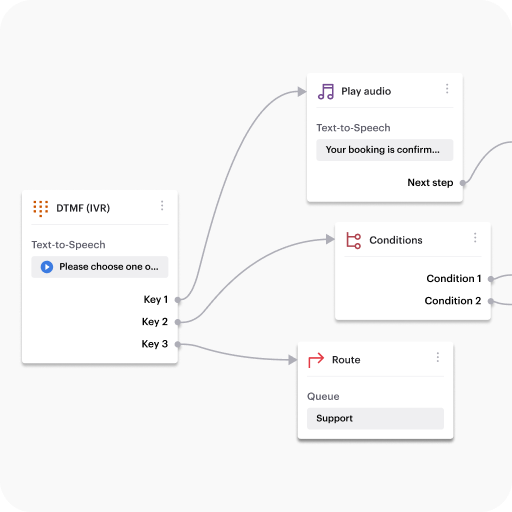
Voiso’s intuitive Flow Builder tool enables your IT team to design custom inbound workflows designed to meet your customers’ support needs.
Whether it’s automated call routing, a personalized IVR menu, or a FAQ chatbot, Flow Builder gives your team the tools to optimize support and improve service speed – without the need for any coding.
Optimal customer outreach
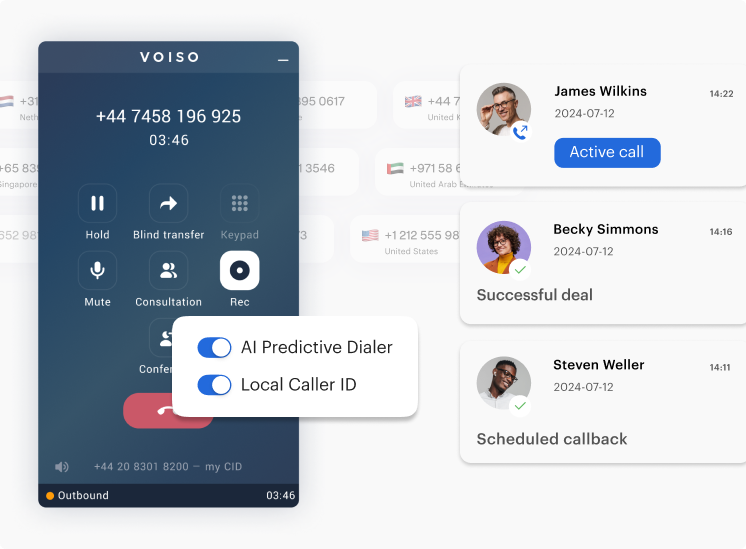
Voiso’s AI-powered predictive dialer accelerates outbound campaigns and maximizes productivity by dialing numbers in bulk at the best times.
By automatically filtering out voicemails and busy signals, agents are only connected to live calls, allowing them to focus on high-value interactions and better customer engagement.
Enhanced conversation analysis
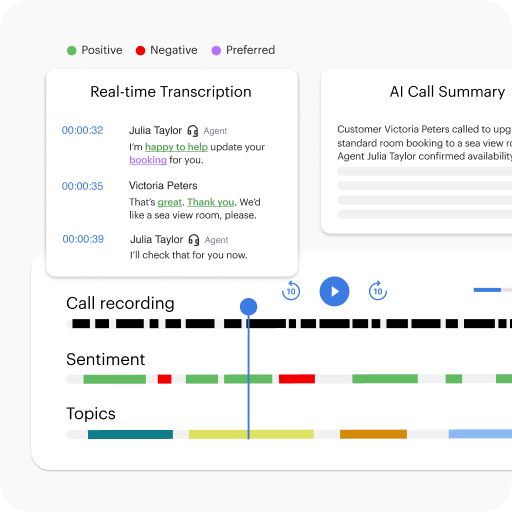
Backed by AI, Voiso’s speech analytics gives IT teams a better understanding of customer’s needs with in-depth analysis into tone of voice, sentiment, and recurring issues.
Your IT teams can easily address technical issues and improve troubleshooting processes, providing customers with more effective resolutions.
Actionable insights
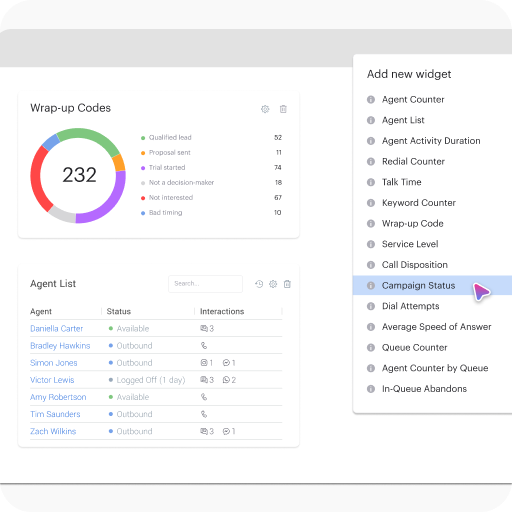
With Voiso’s real-time dashboards, your IT teams have instant access to key metrics like response times, agent performance, and customer satisfaction.
Its user-friendly interface makes it easy to track support team effectiveness and make data-driven decisions based on reliable information.

Get started in
less than 24 hours
FAQ for Voiso's IT Contact Center Solution
Can Voiso integrate with our CRM or ticketing system?
Yes, and not just in a “check the box” kind of way. Voiso was built to connect with the tools your team already relies on. Whether you’re using Salesforce, HubSpot, or Zoho, the platform integrates smoothly, most of the time, it’s just a matter of a few clicks. But the real flexibility comes from Voiso’s open API. That’s where it gets interesting. It means you can also create tailored connections with ticketing platforms like Zendesk or Freshdesk, or even your own in-house systems if you’re running something a little more bespoke.
This type of integration isn’t just about syncing data for the sake of it. It’s about improving the actual support experience, enabling agents to see full customer histories, prioritize requests more accurately, and follow up without asking the same questions over and over. It removes friction. And when you’re juggling virtual phone lines, sales conversations, and tech issues, that matters. A lot.
How can Voiso help us scale our tech support operations globally?
Scaling tech support across different time zones, languages, and teams is messy. Let’s just say it upfront. But Voiso helps simplify a lot of that complexity. It gives you global cloud-based telephony that’s ready to support distributed teams from day one. You get smart call routing that’s aware of skills, location, and even call history, so you’re not sending customers in circles when they just want answers. And thanks to virtual numbers and worldwide calling coverage, you’re not limited by geography. Teams can work from anywhere while still delivering a unified, professional support experience.
The platform also supports all the channels your users expect, calls, messaging, even WhatsApp or Viber, so conversations can flow naturally without forcing people into one format. And because everything’s managed from one dashboard, leadership doesn’t lose sight of what’s going on, even as things scale. You can see performance, track quality, and adapt, without feeling like the system’s slipping out of control.
Does Voiso support outbound engagement for onboarding or renewals?
Absolutely, and not just outbound calls in the traditional sense. Voiso’s outbound engagement tools are built for IT environments where timing and context really matter. Take onboarding: when a new customer signs up for your platform, your team can automatically trigger a welcome call, send a message, or start a guided walkthrough, whatever makes sense based on their actions. It’s not scripted or robotic. It’s responsive.
The predictive dialer comes in handy here too. You can set up campaigns around feature activation, license renewal, or trial conversion. Agents aren’t stuck dialing manually, and you’re not wasting time calling leads who won’t pick up. And for support teams, this approach helps reduce churn, not just because you’re “reminding” people, but because you’re actively helping them get more value out of your platform. It’s proactive customer management through telephony and communications that actually move the needle.
Can we monitor technical calls for quality or issue tracking?
Yes, you can, and it’s far beyond just “recording calls and listening later.” Voiso includes speech analytics that actually helps surface what’s going on in those technical support conversations. You can transcribe calls in real time, highlight key phrases (like error codes, product names, or complaints), and detect customer sentiment as the call happens. This is especially useful in IT environments where a seemingly minor issue can signal a bigger trend, like repeated setup problems, or confusion around a new feature release.
Call data can be categorized by team, region, product line, whatever fits your workflow. And if you’ve ever tried to pull patterns manually from support logs or CRM comments, you’ll appreciate how much time this saves. It’s not perfect (nothing ever is), but it’s accurate enough to help support leaders catch blind spots and coach their teams more effectively. In short, it provides actionable visibility into what’s really happening on your tech support lines.
Is Voiso secure for handling technical and customer data?
Yes, Voiso is built with data protection at its core, because when you’re handling customer configurations, support logs, or internal IT issues, the last thing you want to worry about is exposure. Voiso provides end-to-end encryption across all calls and messaging, so sensitive data isn’t left vulnerable. There are also role-based access controls, which means only the right people can access the right information at the right time. No more, no less.
But beyond just ticking security boxes, the platform follows best practices in cloud communications management. Multi-factor authentication? Standard. Encrypted data storage? Of course. Real-time call logs and user audits? Built in. It’s not overly flashy, it just works. And for businesses subject to strict compliance rules (GDPR, HIPAA, etc.), that kind of quiet, reliable security is exactly what’s needed. It’s about protecting your customers, your systems, and, let’s be honest, your reputation too.
What is IT contact center software, exactly?
At its core, IT contact center software helps support teams manage customer communication across different channels, voice, chat, SMS, email, and sometimes even messaging apps. But where it differs from more basic call center solutions is in the depth of functionality. It’s not just about answering calls. It’s about managing complexity.
Think of it this way: regular call center tools might get the job done if you’re only routing inbound calls. But IT contact center software? It adds layers. You’ve got integrated ticketing systems, omnichannel dashboards, CRM syncing, and built-in analytics that help you notice trends, like repeated issues or slow resolution times. There’s also IVR (interactive voice response), which can direct people based on what they need, saving everyone time. And since it’s usually cloud-based, it scales easily across remote teams. It’s not overkill, it’s just a better fit for technical environments where details matter.
What features should you look for in call center software for tech support?
That depends a little on your setup, but there are some core features that tend to make a real difference in IT support environments. First, you’ll want advanced call routing, skills-based, queue-based, or even round-robin routing can help make sure the right person answers the call the first time. Without that, you end up bouncing customers between agents, which frustrates everyone.
Next, look for built-in CRM integration. If your agents can’t see a full customer or device history, you’re already behind. Real-time reporting and call monitoring are also key, especially for spotting recurring issues or coaching your team. Oh, and cloud-based deployment? That’s pretty much a must now, especially with hybrid or remote teams. Some tools offer extras like automatic ticket generation or speech analytics, great for more mature setups. It’s not about ticking every box; it’s about picking features that actually fit how your support works.
How does omnichannel support improve customer service in an IT contact center?
Omnichannel support changes everything, when it works well. It lets your customers reach out using whatever channel they’re most comfortable with, whether that’s a phone call, an email, a live chat box, or even something like WhatsApp. But the magic isn’t in the variety. It’s in the continuity.
Imagine a user emails your team in the morning, then calls in the afternoon. With omnichannel support, the agent who picks up the call sees that email thread. There’s context. There’s no need to repeat everything. It’s smoother. More human. And that’s the difference.
In IT support, where problems can be layered or hard to explain, having access to the full communication trail saves time and avoids confusion. It also helps your team sound more coordinated, even if they’re scattered across time zones. That connected experience, even across different platforms, is what turns frustrated users into loyal customers.
What kind of reporting and analytics tools should IT contact centers prioritize?
Not all reports are helpful. Some are just noise. But for IT contact centers, there are a few kinds of reporting tools that really pull their weight. First off: call volume trends. You’ll want to know when you’re getting spikes, maybe after product updates or service disruptions. Next, resolution times. Not just how long agents are on calls, but how long it takes for a ticket to actually get closed. That’s the real KPI.
Then there’s sentiment analysis. Some platforms offer this now, using speech analytics or chat transcripts to figure out how the customer felt, frustrated, calm, confused. It’s not perfect, but it can help you identify issues before they explode. You’ll also want agent performance dashboards, queue wait times, first-call resolution rates, and if possible, customer satisfaction surveys built into the workflow. In the end, good analytics don’t just show what happened, they help you figure out what to change next.
Is cloud-based contact center software better than on-premise for IT teams?
In most cases, yes, but it’s not always so black and white. Cloud-based systems have a lot going for them: fast setup, low upfront costs, and flexibility to scale up (or down) as your team grows. For IT teams, especially those supporting users in different countries or time zones, that flexibility is a game changer. You’re not tied to one physical server room or stuck waiting for local installations.
Cloud platforms are also easier to update, which means you get access to new features and security patches faster. And most of them come with built-in redundancy, which reduces downtime, a big win if your contact center is part of your service backbone. That said, if your organization deals with ultra-sensitive data or has strict compliance requirements, on-premise might still make sense. But for most tech teams? Cloud just makes the job a little less complicated. And that’s usually worth it.
How does an IVR system improve efficiency in IT support workflows?
An IVR – Interactive Voice Response – system might seem simple on the surface, but in IT support environments, it’s often one of the most effective tools you have. It acts as the first line of triage, guiding users through a menu before they speak with a live agent. That might sound like just another phone tree, but when designed well, it saves time for both sides. Imagine this: a user calls in with a login issue. Instead of waiting on hold just to get transferred, they select “account access” and go straight to a specialist.
It also helps agents prioritize. If five calls are in the queue, and one is flagged as a critical server outage, IVR routing can bump it forward automatically. Plus, IVR doesn’t just route, it can collect info. Ticket number, device ID, account email. Little details that take time to ask manually but make a big difference once the agent picks up. It’s simple, but powerful.
What role does call monitoring play in improving IT support quality?
Call monitoring isn’t just for catching mistakes, it’s a vital part of how tech support teams grow. Supervisors can listen in real time or review recordings later to understand how agents handle complex issues, especially when technical knowledge and communication skills need to go hand in hand. Maybe an agent knows the solution but struggles to explain it clearly. That’s a coaching opportunity.
But it’s not only about performance. Call monitoring helps identify common pain points customers are experiencing. If three users mention the same bug in a week, that’s a red flag. And on the compliance side, it’s a way to ensure agents aren’t sharing sensitive info improperly. Many platforms now offer call scoring and even AI-based suggestions. It’s not surveillance, it’s insight. Done right, it helps good agents become great and turns every interaction into a chance to improve.
Can contact center software help reduce ticket resolution times in IT environments?
It can, and in many cases, it already does. One of the most frustrating parts of technical support (for both users and agents) is the wait. Contact center software can reduce that significantly by streamlining how tickets are created, assigned, and updated. For example, when a customer calls or messages your support team, the system can automatically open a ticket and populate it with relevant data, call recording, device info, previous interactions. That’s a huge head start.
Smart routing ensures the ticket lands with the right specialist from the start, cutting down on handoffs. Integrated notes and CRM data mean agents don’t need to go digging for context. And with built-in reminders or escalation rules, high-priority issues don’t get buried. Resolution time isn’t just about speed, it’s about precision. And when your contact center platform is designed to support that, the whole experience improves. Quicker answers. Fewer follow-ups. Less frustration all around.