





Zoho Call Center Integration
Boost productivity & unify data with Voiso's Zoho CRM integration
Easily connect your Voiso contact center with Zoho CRM to streamline calls, automate logging, give agents enhanced visibility of interactions, and leverage Voiso's AI-powered tools — all in one place. Deliver better conversations and higher performance without switching tabs or duplicating work.
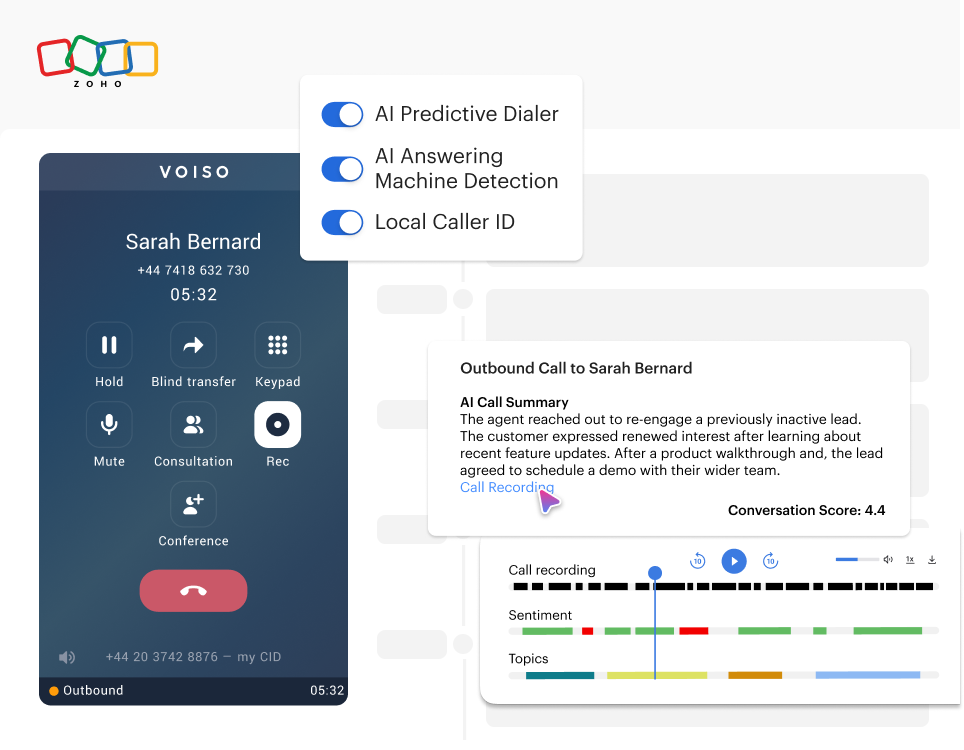


The Zoho x Voiso Integration
Click-to-call for any contact
Agents can launch calls in Voiso with a single click, directly from any contact or lead record in Zoho CRM. No more copy-pasting or manual dialing — just faster conversations.

Screen pop for all calls with AI insights
Instantly see the caller’s CRM record when using Voiso’s softphone. Give your agents the context they need to personalize every conversation.
Enhance Zoho call logs with Voiso’s AI Speech Analytics — automatically add AI-generated conversation summaries, quality scores, and direct links to call recordings and transcripts in Voiso.

Import calling lists and use AI outreach tools
Easily pull lead and contact lists from Zoho into Voiso to launch targeted outbound campaigns with minimal effort.
Leverage Voiso’s powerful outreach tools — like AI Predictive Dialer, AI AMD, and Local Caller ID — to supercharge your campaigns.


Get started in less than 24 hours
FAQs on the Voiso x Zoho Integration
How do I connect Zoho CRM with Voiso?
Install the Voiso extension from the Zoho Marketplace and enable the integration in your Voiso Admin panel under Integrations > Zoho. Make sure the email addresses for users match across both platforms.
What call details are logged in Zoho CRM?
Voiso automatically logs all calls in Zoho, including:
- Call direction (inbound or outbound)
- Timestamp and duration
- Agent notes
- Outcome/disposition codes
- AI-generated call summaries and scores
- Links to call recordings and transcripts (hosted in Voiso)
All data appears directly within the associated Zoho contact, lead, or ticket.
Can I launch outbound campaigns in Voiso using Zoho contacts?
Yes. You can import lead and contact lists from Zoho into Voiso’s dialer campaigns. Simply select a Zoho campaign during campaign setup in Voiso, and the associated calling list will be pulled in automatically.
Does the integration support screen pop?
Yes. When a call is routed to an agent, Voiso automatically displays the caller’s record in Zoho CRM, so agents have full context before answering.
Can I access call recordings and transcripts in Zoho?
Yes. The integration adds links to call recordings and transcripts in Voiso, along with AI-generated summaries and quality scores, directly within each CRM call log.
How long does the setup take?
Initial setup takes just a few minutes — no coding required. Once the extension is installed and credentials match across systems, agents can start calling from Zoho right away.
Do I need any technical skills or admin permissions?
You don’t need to be a developer to set up the integration. However, you’ll need Zoho CRM admin access to install the Voiso app and grant permission scopes during setup.
Does this integration support Zoho Desk or just Zoho CRM?
Currently, the Voiso integration supports Zoho CRM. If you’re interested in Zoho Desk functionality, reach out to our team to explore roadmap updates or custom solutions.
Is the integration compatible with Zoho CRM Plus or Enterprise editions?
Yes. The Voiso integration is compatible with Zoho CRM Plus, Enterprise, and other paid plans that support telephony integrations and custom modules.
Can I trigger follow-up messages or actions based on call outcomes?
Yes. You can use Zoho’s workflow rules in combination with Voiso’s call data to trigger follow-up tasks, assign leads, or send emails based on specific call results, durations, or tags.
How does Voiso handle security and compliance?
Voiso complies with major security standards including ISO 27001 and PCI DSS. Calls are encrypted, recordings are securely stored, and number masking is available to protect sensitive data during interactions.